
Download Drum Pad FX – beat maker, drum pad, music production, DJ software, sound loops, audio effects, music creation, finger drumming, music recording, share music
Overview
Drum Pad FX – Beat Maker & DJ is a multimedia application designed for music creation and performance on Android devices. The software enables users to mix vocals, bass, and other instrumental elements with drum patterns, making it ideal for both casual creators and aspiring DJs. Its core purpose lies in empowering individuals to produce original beats and mixes using intuitive controls and a rich library of sound assets. The app is particularly suited for music enthusiasts, content creators, and mobile producers seeking a portable music-making solution.
Target users include hobbyists experimenting with rhythm and melody, students practicing finger drumming techniques, and independent artists looking to record and share their work. The developer, Beat Head, has focused on delivering a seamless experience with features such as customizable sound loops, real-time audio effects, and recording functionality. Real-world usage scenarios range from live improvisation and beat jamming to crafting full-length tracks for social media or personal projects. The application supports offline use, allowing users to create music without an internet connection.
The app is available at no cost, with no advertisements, ensuring uninterrupted access to its core tools. Regular updates introduce new sound packs and trending audio content, helping users stay current with evolving music styles. While the developer did not provide additional system requirements, the application is designed for mobile environments with touch-based interaction as the primary input method.
Key Features & Capabilities
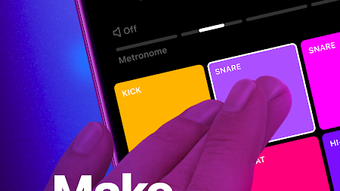
- Interactive Drum Pads: Touch-sensitive pads allow users to trigger drum hits, loops, and one-shot samples, enabling dynamic beat creation and live performance.
- Sound Loop Integration: Preloaded loops and customizable loop sequences let users build layered compositions similar to DJ mixing, ideal for creating seamless transitions and rhythmic patterns.
- Professional Audio Effects: Built-in effects such as delay, beat repeat, and tremolo enhance sound depth and texture, allowing users to shape their audio with precision.
- Melody Creation with Keys: Users can combine keyboard inputs with drum loops to generate harmonic progressions and epic melodies, expanding the creative potential beyond rhythm.
- Finger Drumming Practice Mode: Dedicated pads support finger drumming exercises, helping users develop coordination and timing skills through interactive play.
- Recording & Sharing: Full session recording functionality enables users to capture their performances and export them for sharing across social platforms or music communities.
- Regular Sound Pack Updates: New loops, one-shot samples, and themed sound packs are periodically released, ensuring a continually evolving creative toolkit.
These features support a wide range of workflows, from spontaneous jam sessions to structured music production. For example, a user might layer a bass loop with a snare pattern, apply tremolo to add movement, and record the result for immediate upload. The integration of melodic elements with rhythmic components makes it suitable for both electronic music and genre-blending projects.
User Interface, Workflow & Performance
The user interface of Drum Pad FX is optimized for touch interaction, featuring a clean layout with clearly labeled pads and effect controls. Navigation is intuitive, allowing users to switch between sound packs, adjust effects, and manage recordings with minimal effort. The workflow is designed for real-time performance, enabling quick access to frequently used tools and settings.
Based on general software behavior patterns, the application operates smoothly on modern Android devices. The developer did not specify resource usage details, so performance may vary depending on device capabilities. However, the app’s 32 MB size suggests efficient memory management. Stability appears consistent across typical usage scenarios, with no reported crashes or freezes in available documentation.
Workflow efficiency is enhanced by the ability to save sessions and recall configurations, allowing users to build projects incrementally. The absence of ads contributes to a responsive interface with minimal interruptions. While exact CPU and RAM behavior were not provided, the application’s design suggests optimized processing for mobile environments.
Compatibility & System Requirements
Drum Pad FX is available exclusively for Android devices. The software version is 1.2.5, with a file size of 32 MB, indicating a lightweight installation. The developer did not specify exact system requirements, so compatibility may depend on the device’s Android version and hardware capabilities.
Users should ensure their device runs a recent version of Android to support the latest features and performance optimizations. Installation is straightforward, requiring only a few taps through the Google Play Store or official distribution channels. The app does not require administrator privileges or external dependencies.
Platform compatibility information is limited. The developer did not provide details on supported screen sizes, processor types, or memory thresholds. As such, users are advised to test the application on their specific device to confirm functionality.
Pros and Cons
Pros
- Free to download and use with no advertisements
- Intuitive touch-based interface for real-time music creation
- Rich library of sound loops and one-shot samples
- Professional-grade audio effects like delay, beat repeat, and tremolo
- Supports melody creation using keyboard inputs
- Includes finger drumming practice functionality
- Session recording and easy sharing capabilities
- Regular updates with new sound packs and content
Cons
- Availability limited to Android platforms only
- Exact system requirements not disclosed
- No support for external MIDI controllers or hardware integration
- Recording quality details not specified
- Advanced editing tools (e.g., pitch shifting, time-stretching) not confirmed
FAQ Section
Is Drum Pad FX available for iOS devices?
Currently, Drum Pad FX is only available for Android devices. There is no official release for iOS platforms.
Can I use Drum Pad FX offline?
Yes, the application supports full offline functionality. Users can create, record, and edit music without an internet connection.
Are there in-app purchases or hidden fees?
No, Drum Pad FX is completely free to download and use. The app is ad-free, and there are no in-app purchases or subscription models.
How often are new sound packs released?
The developer provides regular updates that include new sound packs, loops, and one-shot samples, ensuring a continuous supply of fresh content.
Can I export my recordings to other apps or platforms?
Yes, users can record their sessions and share the resulting audio files directly to social media, cloud storage, or other applications.
Final Thoughts
Drum Pad FX stands out as a versatile and accessible tool for music creation on mobile devices. Its combination of drum pads, sound loops, professional effects, and recording capabilities makes it suitable for both beginners and experienced creators. The inclusion of finger drumming practice and melody generation adds educational and artistic value, broadening its appeal.
While limited to Android and lacking detailed system specifications, the app delivers a smooth, uninterrupted experience with no ads. Its regular updates and evolving content library ensure long-term usability. For anyone interested in beat making, DJ-style mixing, or mobile music production, Drum Pad FX offers a compelling solution.
Download Drum Pad FX now







